Retail and Hospitality Hardware

Counter, Kitchen and Shop Floor Hardware

POS terminals, receipt and kitchen printers, cash drawers, scanners and label printers for stores, restaurants, bars and hospitality venues. Specified against your POS software and the connection it actually expects.

Interface Confirmed Before You OrderMFi Certified Options for iPad POSImpact Printing for KitchensMatched Drawer Cables and Paper
Counter, Kitchen and Shop Floor Hardware

The Counter Is the Business

In retail and hospitality the hardware is not a back office concern, it is standing between your staff and the customer. When a printer will not pair or a drawer does not open, the queue sees it happen.

That changes what matters. A warehouse device is judged on whether it survives five years of abuse. A counter is judged on whether it works first time, every time, at the busiest hour of the week, in front of someone waiting to pay.

Most of the pain in this category is not about durability at all. It is interface mismatches, a printer that cannot pair with an iPad because it is not MFi certified, a drawer cable wired for the wrong printer brand, or a scanner that cannot read the loyalty code on a customer's phone.

Almost every avoidable support call in retail hardware traces back to a connection decision made at order time.

The Counter Is the Business
0 downtime What a failed till costs

A counter that cannot take payment stops trading entirely. Commercial hardware is specified for continuous duty, not occasional use.

MFi Required for Apple pairing

Bluetooth printers must be MFi certified to pair reliably with iPads and iPhones. A non-certified model will not connect.

80mm Standard receipt width

58mm exists for compact and mobile printers, but layouts formatted for one width will not print correctly on the other.

Impact The only option for kitchens

Thermal paper darkens with heat and fails above a grill. Impact printing on plain paper survives, and is the only way to produce carbon copies.

Five Questions Before You Order

Most retail hardware problems are decided at order time, not in use. These are the questions worth answering first.

01

What POS Software Will It Run?

Start here, because the software decides nearly everything else. Cloud and tablet platforms usually expect Android or iPadOS and publish a short list of approved printers. Established retail and restaurant packages tend to expect Windows and a wider set of ports. Get the vendor's supported hardware list before pricing anything.

02

Which Interface Does It Need?

USB, Ethernet, Bluetooth, Wi-Fi and Lightning are separate part numbers on the same printer, and the interface is fixed at manufacture. This is the single most common ordering mistake in retail hardware. If the POS is iPad based, confirm MFi certification specifically, because plain Bluetooth will not pair reliably.

03

How Many Stations, and What Kind?

A counter, a kitchen position and a mobile server are three different builds. Count them separately rather than ordering a single quantity. Kitchens need impact printers; counters need thermal; mobile positions need battery and Bluetooth. Specify each station type once, then multiply.

04

What Do the Consumables Cost You?

Paper width, ribbon type and label stock are ongoing costs that outlast the hardware decision. 80mm is standard at the counter and 58mm on compact printers, and layouts do not transfer between them. Impact printers need ribbons; thermal printers do not. Work out the annual consumable cost before choosing on unit price.

05

What Happens When You Open the Next Site?

Equipping one store is a purchase; equipping a chain is a standard. Once several sites run the same hardware, paper, ribbons, drawer cables and spares interchange, and staff moving between locations already know the equipment. Choosing the cheapest option per site quietly removes all of that.

Get It Right First Time

Send us your software name, the connection it requires and how many stations you are equipping. We will confirm every part number before anything ships.

Talk to a Specialist

Hardware by Retail Workflow

A store and a restaurant use much of the same hardware, but the front counter, the kitchen and the shop floor each impose different requirements on it.

Workflow What It Involves Hardware Needed Key Consideration Shop
01Checkout

Taking payment at a fixed counter, printing a receipt and opening the drawer for cash transactions.

  • POS terminal
  • Thermal receipt printer
  • Cash drawer
  • Presentation scanner

The printer interface is fixed at manufacture. USB, Ethernet, Bluetooth and Lightning are separate part numbers, and the wrong one is the most common ordering mistake in the category.

02Kitchen and Bar

Sending orders from the front of house to the kitchen, bar or pass, where the ticket has to stay readable through service.

  • Impact kitchen printer
  • Ink ribbons
  • Buzzer or alert

Use impact, not thermal. Thermal paper darkens with heat and degrades with grease, and impact is the only way to produce a multi-part carbon ticket where the kitchen and pass each need a copy.

03Line Busting and Table Service

Taking orders and payment away from the counter, at the table, in a queue or at a pop-up.

  • Mobile receipt printer
  • Card reader
  • Tablet stand or case

Bluetooth pairing with iPads and iPhones requires an MFi-certified printer. A non-MFi Bluetooth model will not pair reliably, regardless of what the specification sheet claims.

04Product and Shelf Labelling

Producing price labels, shelf edge tickets, food date labels and promotional signage in store.

  • Desktop label printer
  • Label stock
  • Barcode scanner

Direct thermal is cheaper to run and fine for short-life price and date labels. Anything that must survive months on a shelf, or handling and sunlight, needs thermal transfer with a ribbon.

05Stock Counts and Receiving

Checking deliveries in and counting stock on the shop floor and in the back room without tying up the till.

  • Cordless scanner
  • Mobile computer
  • Charging cradle

A cordless scanner with batch memory keeps working out of Bluetooth range and uploads when it reconnects, which matters in stockrooms and basements where coverage is poor.

Most sites start at the counter and extend outward. Keep the printer brand consistent as you add stations, so drawer cables and paper stock interchange across the estate.

Discuss Your Setup

What Actually Breaks Counter Hardware

Retail hardware rarely fails from a single dramatic event. It fails from heat, grease, spills and the compounding cost of seconds lost at peak.

Heat and Grease

What happens

Thermal paper darkens with heat and is degraded by grease, so a ticket printed above a grill can be unreadable within minutes of being hung on the pass.

What to specify Use impact printers in the kitchen and keep thermal for customer receipts at the counter. Impact also produces multi-part carbon tickets, which thermal cannot.
  • impact
  • kitchen

Codes on Phone Screens

What happens

Loyalty codes, mobile coupons and digital gift cards are shown on a customer's phone. A 1D laser scanner cannot read a screen at all, so staff key the number by hand or the offer is abandoned.

What to specify A 2D imager reads both printed barcodes and phone screens. The price difference over a 1D laser is small and the failure mode is highly visible to the customer.
  • 2d
  • retail

Drawer Cable Compatibility

What happens

Printer-driven cash drawers use an RJ11 or RJ12 connector that looks identical across brands, but the pin wiring differs. A cable that fits may not trigger the drawer.

What to specify Order the drawer cable matched to your printer brand, not just to the connector shape. This is the single most common avoidable support call at install.
  • printer driven

Spills and Constant Cleaning

What happens

Hospitality counters get wiped down all shift and drinks get knocked over. Unsealed keyboards and open-frame monitors fail quickly in that environment.

What to specify Look for sealed, wipeable surfaces and an IP rating on anything customer-facing. Fanless terminals also avoid drawing grease and dust into the chassis.
  • fanless
  • rugged

Limited Counter Space

What happens

Boutiques, salons and food trucks rarely have room for a full terminal, printer, drawer and scanner laid out separately, so hardware ends up stacked or trailing cables across the customer-facing surface.

What to specify Compact printers with a built-in peripheral hub let the scanner and drawer connect through the printer rather than the terminal, which removes most of the cabling from the counter.
  • countertop
  • 58mm

Peak Trading Throughput

What happens

Hardware that copes on a quiet Tuesday can become the queue on a Saturday. A slow cutter or a scanner that needs a second attempt costs seconds per transaction, which compounds across a rush.

What to specify Specify against your busiest hour. Auto-cutters, presentation scanners and a drawer that opens reliably first time matter more at peak than any headline specification.
  • auto cutter
  • presentation

Specify against your busiest hour rather than an average one. Hardware that copes on a quiet weekday can become the queue on a Saturday.

Check Your Requirements

Complete Retail Systems

A counter is a set of devices that have to agree with each other. These configurations pair the terminal, printer, drawer and scanner so the cables and interfaces are right on arrival.

Complete Counter Bundle
Retail SystemWindows or Android

Complete Counter Bundle

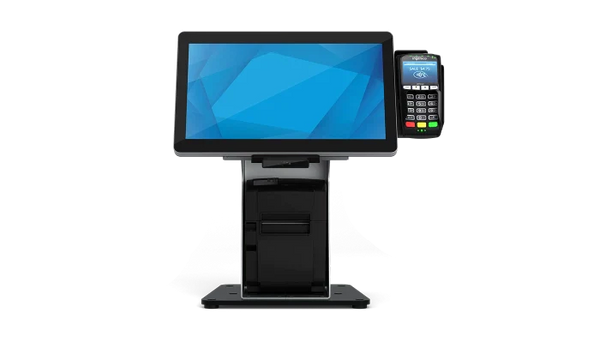
A full station in one order: terminal, receipt printer, cash drawer, scanner and the cables that connect them. Available as a Windows build for established retail packages, or Android where the software is cloud or tablet based.

  • All-in-one POS terminal, Windows or Android
  • 80mm thermal receipt printer with auto cutter
  • Printer-driven cash drawer with matched cable
  • 2D barcode scanner that reads phone screens
  • Receipt paper starter stock
Windows or AndroidAll In One80mm ThermalMatched CablesSingle Order
Request Counter Bundle Quote
Mobile Checkout
Retail SystemMobile

Mobile Checkout

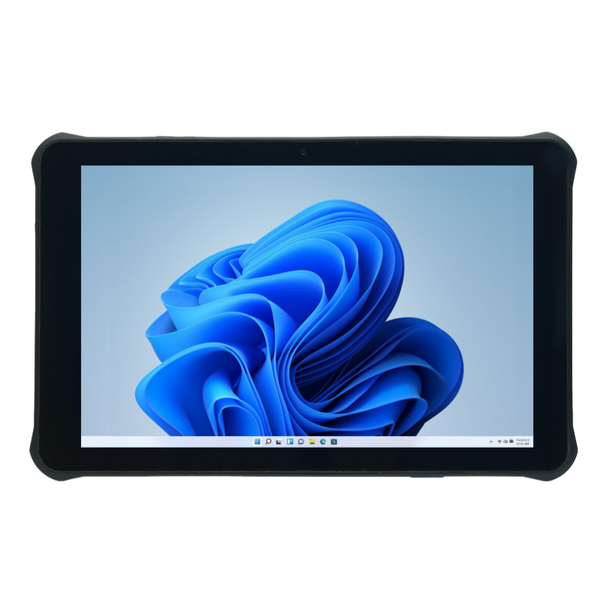
Taking payment away from a fixed counter, at the table, in a queue or on the shop floor. A rugged Windows or Android tablet paired with a belt-worn printer and a card reader, so the whole transaction completes where the customer is standing.

  • Rugged tablet, Windows or Android
  • Belt-worn or portable Bluetooth receipt printer
  • Card reader, contactless and chip
  • Charging cradle and spare battery
  • Hand strap or case for one-handed use
Windows or AndroidBluetoothMFi AvailableBattery PoweredLine Busting
Request Mobile Checkout Quote
Multi-Lane Retail Bundle
Hardware BundleMulti-Lane

Multi-Lane Retail Bundle

A repeatable per-lane configuration for stores running several checkouts, standardised so every lane holds the same hardware and spares interchange.

  • Matched terminal per lane
  • Networked receipt printers
  • Cash drawers and tills per station
  • Presentation scanners and customer displays
Multi-LaneNetworkedStandardisedRetailInterchangeable
Request Multi-Lane Quote

Opening or refitting multiple sites?

Tell us your POS software, how many stations per site and whether any are kitchen or bar positions. We will specify each station type once, confirm the interfaces with your software vendor, and stage delivery so each location receives a complete working set.

Request a Site Recommendation

Questions We Get About Retail Hardware

The questions that come up most often at install, and the answers that prevent them.

Which manufacturers do you carry for retail and hospitality?

For counter printing we carry Star Micronics, Epson, Citizen and Custom America. For cash drawers, APG, Star and Custom America.

For scanning, Zebra, Honeywell and Datalogic. For labelling, Zebra, Brother and Citizen.

We are not tied to a single manufacturer. Which is right depends on your POS software and the connection it expects, and we would rather specify against that than push one brand.

What retail and hospitality solutions do you offer?

Point of sale for counters, terminals, printing and cash management. Barcode labelling for price, shelf and date labels. Inventory control for stock counts and receiving.

Barcode scanning across checkout and shop floor, and hardware bundles where a whole station needs equipping at once.

We also pre-configure and stage hardware for multi-site rollouts, so each location receives a working set rather than a box of parts.

What other retail and hospitality applications do you supply hardware for?

We supply the hardware behind a wide range of software applications, without being tied to any of them. Common ones include self-ordering and self-checkout kiosks, table-side ordering and payment, queue busting on the shop floor, loyalty and membership check-in, appointment and salon booking, golf and club management, ticketing and admissions, laundry and garment tag printing, and consignment or resale inventory.

Each changes the hardware slightly. Kiosks need front-exit printers and presentation scanners; check-in needs badge or wristband printing; garment tagging needs impact printing on tag stock. Tell us the application and we will specify against it.

What hardware works best for a food truck or market stall?

Space and power are the constraints, not throughput. A compact 58mm or 80mm printer with an integrated peripheral hub keeps the counter clear, because the scanner and drawer connect through the printer rather than the terminal. If you run from a tablet, confirm MFi certification for iPad or Android compatibility before ordering.

Battery-powered mobile printers matter if you take payment away from the window. A cash drawer is often optional in mobile food, but where one is used a compact 13 inch model fits better than a full 16 inch.

See receipt printers and compact cash drawers.

What do we need for delivery and online order fulfilment?

Delivery adds a second print job to an existing counter: the order ticket for the kitchen and a label or docket that travels with the bag. Sites running high delivery volume usually add a dedicated printer for incoming orders so the counter printer is not competing with walk-in trade at peak.

Linerless or sticky label printers are worth considering for bag sealing and order identification, since a label that sticks to the bag survives the journey better than a docket tucked inside.

See label printers and receipt printers.

What is different about self-ordering kiosk hardware?

A kiosk prints unattended, so the printer has to present paper in a way a customer can take it without opening anything. That means a front-exit or kiosk-specific printer rather than a standard counter model, and usually a presentation scanner mounted behind glass rather than a handheld.

Paper capacity matters more than at a counter, because nobody is standing there to reload it. Specify the largest roll the enclosure takes, and consider a near-end paper sensor so you find out before the customer does.

See kiosks and receipt printers.

Should we choose Windows or Android for the terminal?

The software decides this more than you do. Cloud and tablet-first platforms increasingly expect Android or iPadOS, while established retail and restaurant packages are usually Windows and often need legacy ports for existing peripherals.

Where you genuinely have a choice: Android terminals are typically cheaper, boot faster and suit fixed-function counters. Windows suits sites running back-office software on the same machine, or where the peripheral mix includes older serial devices. Ask your software vendor which they certify, since running an uncertified combination usually means unsupported.

Which ribbon do I need for my impact printer?

Impact printers strike an ink ribbon onto plain paper, and the cartridge is specific to the printer family. Fitting the wrong one is the most common consumable mistake.

Epson TM-U220, U210, U230, U325, U375, U300 and U200 take the ERC-38B in black, or the ERC-38BR in black and red where your software prints voids or refunds in red. A case of ten is the sensible order quantity for a busy kitchen.

Star SP700 and SP712 take the black cartridge rated at 3 million characters, or the black and red version. There is also an RC700 indelible ribbon where the print has to resist smudging or tampering.

Bixolon SRP-275 and SRP-270 use their own cartridge, and compatible equivalents are available from Thermamark at lower cost than the branded part.

On paper: impact printers need bond paper, not thermal. Thermal paper will produce nothing at all in an impact printer because there is no heat involved. For duplicate tickets use carbonless multi-part stock such as the two-ply carbonless roll, which is the only way to get a copy for the kitchen and the pass.

Browse all printer ribbons.

What thermal paper do I need for a 3 inch desktop receipt printer?

Standard counter printers, including the Star TSP143 family, mC-Print3, Epson TM-T20 and TM-m30, Citizen CT-S310II and Bixolon SRP-Q302, all take 3.125 inch (80mm) thermal paper. No ribbon is required, because the print head burns the image directly into the coating.

Roll length and case size are what differ. Common options are the RPT3.125-50-PF, 50 foot rolls in a case of 50, and longer 230 foot rolls where you want fewer paper changes at a busy counter. Case quantities of 10, 25 and 50 are all available depending on how much you want to hold.

Two things worth specifying. Phenol-free and BPA-free stock matters if staff handle receipts all day, and is increasingly expected in food service. And coloured stock, such as canary yellow, is useful where a kitchen or back-office copy needs to be visually distinct from a customer receipt.

Do not substitute 2.25 inch (58mm) paper. It fits compact and mobile printers only, and a receipt layout formatted for 80mm will not print correctly on it.

Browse all receipt paper.

Why will my Bluetooth printer not pair with an iPad?
Almost always because the printer is not MFi certified. Apple requires MFi certification for Bluetooth accessories to pair reliably with iPadOS and iOS, and a printer that advertises Bluetooth without it will either fail to pair or drop the connection. Check for MFi explicitly on the part number before ordering for an iPad-based POS.
Why is my cash drawer not opening?
Check the cable before anything else. Printer-driven drawers use an RJ11 or RJ12 connector that is physically identical across brands, but the pin wiring differs. An Epson cable will not reliably trigger a Star printer's drawer port even though it plugs in perfectly. Order the cable matched to your printer brand.
Do we need a 2D scanner or will a 1D laser do?
If you accept loyalty codes, mobile coupons or digital gift cards, you need 2D. A 1D laser cannot read a code displayed on a phone screen at all, and it cannot read QR codes. The price difference is small and the failure happens in front of the customer, so 2D is the safer default for any modern retail counter.
What receipt paper width do we need?
80mm is the standard for counter printers including the TSP143 family and mC-Print3. Compact and mobile printers such as the mC-Print2 use 58mm. Receipt layouts formatted for one width will not lay out correctly on the other, so confirm before ordering paper in volume.
Hardware Selection Support

Not sure which model is right?

Send us what you are trying to do and we will come back with a specific recommendation rather than a catalogue. If you are replacing equipment, a model number or a photo of the existing setup is usually enough to work from.

  • Solutions experts on staff to answer your hardware questions
  • 30 day return policy, excluding consumables
  • In-stock items ship same day when ordered by 4:00pm Eastern
  • Volume and multi-location pricing reviewed on request

Ask a Question

We usually respond within 10 minutes on weekdays.

We use your details to answer your enquiry and nothing else.