Transportation and Logistics Hardware

Hardware That Works From a Vehicle

Mobile computers, full-page and belt-worn printers, vehicle mounts and chargers for delivery, route sales, yard and fleet operations. Specified for cab temperatures, patchy coverage and a driver with one hand free.

Full-Page and Receipt Mobile PrintingVehicle Mounts and 12V ChargingMFi Certified Options for iOSCellular Where Coverage Is Patchy
Hardware That Works From a Vehicle

The Office Is a Vehicle

Transportation hardware has one thing in common that no other vertical shares: it lives in a vehicle and gets used standing up, outdoors, often in one hand. Everything about specification follows from that.

A device chosen for a warehouse assumes mains power, a roof and a floor to stand on. A device chosen for a route assumes none of those. It has to charge from the vehicle, survive weather at every drop, stay readable in direct sunlight, and keep working through areas with no cellular coverage at all.

Printing is where this bites hardest. A proof of delivery is a receipt, but a manifest or bill of lading is a full page, and those are two different printers. Trying to serve both with one device is the most common compromise, and it usually means folding a legal document down to three inches.

If the driver has to put something down to use it, it will eventually be left behind.

The Office Is a Vehicle
8.5 in Full-page mobile printing

PocketJet prints a full letter or A4 page in the cab. Anything narrower means folding a manifest or bill of lading down to receipt width.

No ink Direct thermal in the vehicle

No cartridges to store or replace in a cab. The consumable is the paper, which matters when the printer lives in a vehicle rather than an office.

MFi Required for iPhone and iPad

Driver apps on iOS need an MFi-certified printer to pair reliably. Plain Bluetooth will drop the connection mid-route.

12V Vehicle charging

A device that only charges at base is flat by mid-route. Vehicle chargers and cradles are part of the specification, not an accessory.

Five Questions Before You Equip a Fleet

Transport hardware is used harder than almost any other category and replaced less often. These are the questions worth settling before the first order.

01

What POS Software Will It Run?

Start here, because the software decides nearly everything else. Cloud and tablet platforms usually expect Android or iPadOS and publish a short list of approved printers. Established retail and restaurant packages tend to expect Windows and a wider set of ports. Get the vendor's supported hardware list before pricing anything.

02

How Far Do You Need to Read?

Measure from where the operator stands to your highest rack label. Standard-range engines read at roughly arm's length and will simply not decode a label several levels up. Extended and long-range engines are separate part numbers rather than a setting, so this has to be decided before ordering, not after.

04

How Long Is a Shift?

A device that dies at hour six stops an operator until a charged one is found. Size the battery against your longest shift, then plan multi-bay charging and a spares pool from the start. Hot-swappable packs let a device change battery without powering down, which is what makes a second shift practical on the same fleet.

04

What Do the Consumables Cost You?

Paper width, ribbon type and label stock are ongoing costs that outlast the hardware decision. 80mm is standard at the counter and 58mm on compact printers, and layouts do not transfer between them. Impact printers need ribbons; thermal printers do not. Work out the annual consumable cost before choosing on unit price.

06

How Many Operators, and How Many Sites?

Equipping one workflow is a purchase; equipping a building is a standard. Once several operators carry the same device, spares, batteries and chargers should interchange, which argues for one model rather than the cheapest option each time. Across multiple sites, staged delivery and pre-configuration matter as much as the hardware itself.

Specify It for the Worst Route

Send us your longest route, your document types and the software your drivers use. We will confirm battery sizing, printer width, mounting and connectivity before anything ships.

Talk to a Specialist

Hardware by Transport Workflow

The yard, the cab and the doorstep impose different requirements on the same fleet. What works loading out does not necessarily work at the twentieth drop of the day.

Workflow What It Involves Hardware Needed Key Consideration Shop
01Dispatch and Load Out

Confirming what goes on which vehicle before it leaves the yard, and issuing the driver their manifest.

  • Rugged mobile computer
  • Full-page mobile printer
  • Vehicle mount

A manifest or bill of lading is a full page. Printing it on a 3 inch receipt printer means folding and taping, which is why full-page mobile printers exist for this workflow.

02Delivery and Proof of Delivery

Scanning the parcel at the door, capturing a signature or photo, and printing a receipt where the customer needs one.

  • Mobile computer with 2D imager
  • Belt-worn receipt printer
  • Holster or hand strap

The driver usually has one hand free. A belt-worn printer and a holstered device let them scan and print without putting the parcel down, which is where damage and loss happen.

03Route Sales and Direct Store Delivery

Selling and invoicing from the vehicle, printing an invoice or receipt at the point of delivery and taking payment.

  • Mobile computer
  • Mobile receipt printer
  • Card reader
  • Vehicle charger

This is a full transaction in a doorway. Confirm the printer is MFi certified if drivers use iPhones, and specify a vehicle charger, because a device that only charges at base will not survive the route.

04Yard and Trailer Management

Tracking trailers, containers and equipment around the yard, and confirming what is parked where.

  • Vehicle-mounted computer
  • Long-range scanner
  • Weatherproof labels

Yard labels are read at distance from a moving vehicle, often in poor light and weather. Extended-range scanning and outdoor-rated label media both matter more here than in any indoor workflow.

05Returns and Exceptions

Handling refused deliveries, damages and collections at the door, and labelling items for return to the depot.

  • Mobile label printer
  • Mobile computer
  • Return label stock

A return label printed at the door means the item is identified before it goes back on the vehicle. Without it, exceptions are reconciled by hand at the depot, which is where the cost sits.

Standardise across the fleet where you can. Once drivers share a device model, chargers, holsters and spares interchange, and a failure mid-route becomes a swap rather than a lost day.

Discuss Your Fleet

What Actually Breaks Transport Hardware

Almost none of it is about processing power. Transport hardware fails on power, weather, coverage and the simple fact that a driver only has one hand free.

Life in a Vehicle Cab

What happens

A cab gets far hotter and colder than an office, vibrates constantly, and offers nowhere secure to put a device. Hardware left loose on a seat gets dropped, sat on and lost.

What to specify Specify a vehicle mount and a charging cradle from the start, and check the operating temperature range rather than assuming office conditions apply.
  • vehicle mount
  • rugged

Long Routes, No Charger

What happens

A ten hour route with no mains power is normal. A device sized for an office day is flat before the last drop, taking proof of delivery down with it.

What to specify Size the battery for the longest route, add a vehicle charger, and carry a spare where the device supports hot swap.
  • extended
  • hot swap

Patchy Cellular Coverage

What happens

Routes pass through areas with no signal. A device that only works online stops the driver until coverage returns, and proof of delivery goes uncaptured.

What to specify Choose devices and software that queue offline and sync when coverage returns. Cellular cannot be retrofitted, so decide WWAN against Wi-Fi only at purchase.
  • cellular
  • wifi

Rain, Snow and Loading Bays

What happens

Delivery happens outdoors regardless of weather. Unsealed devices fail after repeated exposure, and a screen that cannot be read in direct sunlight stops the driver working.

What to specify Look for a sealed IP rating and a display rated for outdoor readability. Both are specified at purchase and neither can be added later.
  • rugged
  • ip65

One-Handed Operation

What happens

A driver is usually holding a parcel, a door or a rail. Hardware that needs two hands to operate gets put down, and that is when it gets damaged or left behind.

What to specify Hand straps, holsters and belt-worn printers keep the device attached to the driver. A printer worn on the belt prints without the driver setting anything down.
  • holster
  • mobile

Documents That Must Survive

What happens

Direct thermal receipts fade with heat and sunlight, and a cab in summer is both. A proof of delivery that is blank three months later is a problem when a claim is raised.

What to specify Use direct thermal for the customer copy and archive digitally, or specify a printer and media rated for longer document life where a physical record must be retained.
  • direct thermal

Specify against the longest route in the worst weather, not the average one. A device that copes on a short urban round will not survive a full rural day.

Check Your Requirements
Featured Mobile Hardware

Mobile Printing and Computing for the Road

Three lines cover most transport deployments: full-page printing in the cab, belt-worn printing on foot, and the handheld the driver carries all day.

Brother PocketJet Series
Mobile PrintingFull Page

Brother PocketJet Series

Full-page mobile printing in the cab. The PocketJet prints a complete letter or A4 document, which is what a manifest, bill of lading or inspection report actually needs. Direct thermal, so there is no cartridge to store or change in a vehicle.

  • PJ863 with Bluetooth, or PJ883 with Bluetooth and Wi-Fi
  • 300 dpi across an 8.5 inch page width
  • USB-C connectivity and charging
  • Vehicle mount and car charger available
8.5 inch300 dpiDirect ThermalBluetoothWi-Fi Option
View PocketJet Printers
Brother RuggedJet Series
Mobile PrintingBelt Worn

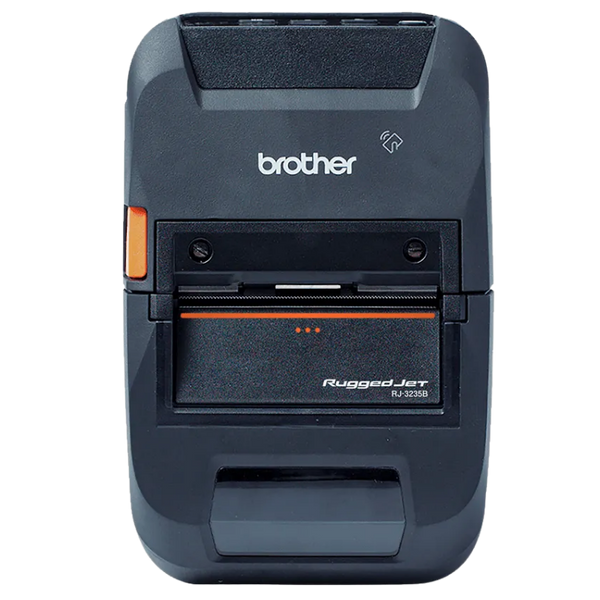
Brother RuggedJet Series

Belt-worn receipt and label printing for drivers working on foot. The RuggedJet prints proof of delivery, receipts and return labels without the driver putting the parcel down, and is built for the drops and weather that come with the job.

  • RJ-3230B-L 3 inch, Bluetooth 5.0, MFi and USB-C
  • RuggedJet 2 for 2 inch receipts and labels
  • RuggedJet 4 with NFC pairing for larger documents
  • Car charger and belt clip available
2, 3 and 4 inchMFi CertifiedBluetooth 5.0Receipts and LabelsRugged
View RuggedJet Printers
Zebra Mobile Computers
Mobile ComputingHandheld

Zebra Mobile Computers

The device the driver carries all day. Zebra's TC2X and EC series pair a proper 2D scan engine with Android and a supported upgrade path, which matters when the fleet has to stay on a certified OS version for the software running on it.

  • TC22 and TC2X series for general delivery and route work
  • EC50 and EC55 where a smaller pocketable device suits
  • 2D imager reads damaged and dirty parcel labels
  • Vehicle cradles, chargers and holsters available
Android2D ImagerWWAN OptionVehicle CradleRugged
View Zebra Mobile Computers

Equipping a fleet?

Tell us your route profile, what documents drivers need to produce, whether they work from the cab or on foot, and what software they run. We will specify the device, printer, mount and charging together, and stage delivery so vehicles are fitted out in batches rather than all at once.

Request a Fleet Recommendation

Questions We Get About Transport Hardware

The questions that come up most often when equipping a fleet, and the answers that prevent a mid-route failure.

Which manufacturers do you carry for transportation and logistics?

For mobile printing, Brother Mobile is the strongest line we carry. The PocketJet series covers full-page documents and the RuggedJet series covers belt-worn receipts and labels. Zebra also make mobile printers in the ZQ range.

For mobile computing, Zebra, Honeywell, Datalogic and Unitech. For vehicle-mounted terminals and mounting hardware we work across several manufacturers depending on the vehicle and the mount required.

We are not tied to one brand. Which is right depends on your software, your route profile and whether drivers work from a cab or on foot.

What transportation and logistics solutions do you offer?

Shipping and fulfilment for dispatch, manifesting and carrier labelling. Asset tracking for trailers, containers, cages and returnable equipment. Inventory control for van stock and route replenishment.

Vehicle-mounted computing for yard and forklift operations, barcode scanning across the whole chain, and RFID where gate reads or bulk container counting are needed.

We also handle B2B re-ordering and mobile sales, which is the same hardware profile as route sales.

Do I need a full-page printer or a receipt printer in the vehicle?

It depends entirely on what the document is. A proof of delivery, a receipt or a return label is receipt or label width, and a 2 to 4 inch belt-worn printer like the RuggedJet handles it well while leaving the driver a free hand.

A manifest, bill of lading, inspection report or invoice is a full page. Printing those on a 3 inch printer means folding and taping, which looks unprofessional and is genuinely hard to read. That is what the PocketJet exists for, at 8.5 inches wide and 300 dpi.

Fleets running both document types usually carry a PocketJet in the cab and a RuggedJet on the driver, rather than compromising with one.

What happens when a driver loses signal?

That depends on the software more than the hardware, but the hardware decision that matters is cellular. WWAN cannot be retrofitted, so a Wi-Fi only device will only sync at base regardless of what the app supports.

Where routes pass through poor coverage, choose a device with cellular and software that queues scans, signatures and photos locally, syncing when the connection returns. Test this specifically before rolling out, because it is the failure that generates the most driver frustration and the most missing proof of delivery.

Will a Bluetooth printer work with our drivers iPhones?

Only if it is MFi certified. Apple requires MFi for Bluetooth accessories to pair reliably with iOS, and a printer advertising plain Bluetooth will either fail to pair or drop the connection mid-route, which in a vehicle is worse than not working at all.

The Brother RuggedJet RJ-3230B-L is MFi certified, as are several other mobile printers we carry. Confirm it explicitly on the part number, because the same printer family often ships in both MFi and non-MFi variants.

Our delivery receipts fade. What can we do?

That is direct thermal behaving normally. The image is burned into a heat-sensitive coating, and heat, sunlight and friction all degrade it. A receipt left on a dashboard in summer can be unreadable within weeks.

Two practical options. Treat the printed copy as the customer's receipt and rely on the digital capture in your software as the record of truth, which is what most fleets now do. Or, where a physical archive is genuinely required, specify media rated for longer life and store it out of light and heat. Standard direct thermal receipt stock is not an archival medium and should not be treated as one.

Hardware Selection Support

Not sure which model is right?

Send us what you are trying to do and we will come back with a specific recommendation rather than a catalogue. If you are replacing equipment, a model number or a photo of the existing setup is usually enough to work from.

  • Solutions experts on staff to answer your hardware questions
  • 30 day return policy, excluding consumables
  • In-stock items ship same day when ordered by 4:00pm Eastern
  • Volume and multi-location pricing reviewed on request

Ask a Question

We usually respond within 10 minutes on weekdays.

We use your details to answer your enquiry and nothing else.