Datalogic Data Capture

Datalogic Scanning from the Counter to the Warehouse

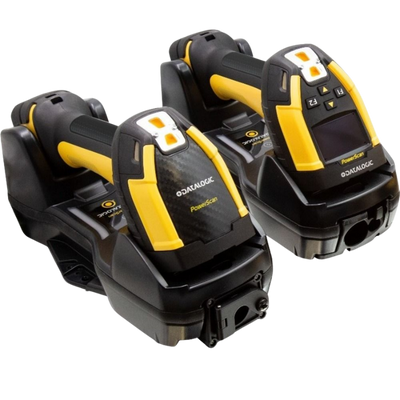
QuickScan and Gryphon handhelds for retail, PowerScan for industrial work, Magellan scanner scales built into the checkout, and Memor and Skorpio mobile computers for the aisle.

Retail & IndustrialGreen Spot FeedbackScanner ScalesCorded & CordlessAndroid Mobile Computers
Green Spot Datalogic projects a green dot onto the barcode to confirm a good read, which works in noisy warehouses and quiet libraries alike where an audible beep does not.
Counter to Yard Gryphon and QuickScan cover retail counters, PowerScan covers industrial drops onto concrete, and Magellan sits inside the checkout itself.
Scanner + Scale Magellan scanner scales read the barcode and weigh produce in one pass, removing a separate step from every grocery transaction.
Datalogic Scanning from the Counter to the Warehouse
Browse the Catalog

Datalogic Hardware In Stock

Filter by category to see what we hold. Counts show the full collection; the grid is a preview, so use the arrow to see everything.

No products found.

Select another filter or return to All Hardware.

Datalogic Hardware Questions

Choosing between QuickScan, Gryphon and PowerScan, reading a part number, and specifying a Magellan scanner scale.

Which Datalogic scanner range should I choose?

QuickScan is the value handheld for retail counters. Gryphon sits above it with better optics and more interface options, and is the usual choice for busy tills and healthcare. PowerScan is the industrial line, built for warehouse and manufacturing.

Magellan is different again: it mounts inside the checkout rather than being held.

Browse handheld scanners, rugged scanners or in-counter models.

What is the difference between QuickScan, Gryphon and PowerScan?

They are three tiers built for three environments, and the gap between them is durability and optics rather than whether they read a barcode.

QuickScan is the value line for retail counters and light commercial use. It reads well, costs least, and is specified for desk-height knocks rather than repeated drops. Choose it for a till that scans a few hundred items a day.

Gryphon sits in the middle and is the volume seller. Better optics mean faster reads on poor or damaged labels, there are more interface and range options, and the build tolerates a busier counter. Healthcare, pharmacy and high-throughput retail generally land here.

PowerScan is the industrial line. Rated for repeated drops onto concrete, sealed against dust and washdown, and available in extended-range optics that read a label several metres up a racking bay. It costs multiples of a QuickScan and earns that in a warehouse where a failed scanner stops a picking line.

The honest guidance: most retail sites need Gryphon, most warehouses need PowerScan, and QuickScan suits a low-volume counter or a tight budget. Browse handhelds or the rugged range.

How do I read a Datalogic part number?

The part number carries the configuration, and the model name alone is not enough to order from. Take PBT9600-ARRB as an example.

PBT is the connectivity prefix on the PowerScan range: PD is corded, PBT is Bluetooth, PM is 910 MHz narrowband with a cradle. 9600 is the model family. AR is the optics: SR standard range, HP high performance, AR auto range, XR extended range, DPM direct part mark for etched and laser-marked codes. RB and similar suffixes cover the kit contents, including whether a base or cradle is in the box.

Two things follow from this. A scanner-only part number and a kit part number look almost identical but differ by the cradle, which on 910 MHz models contains the radio and is not optional. And optics are fixed at manufacture, so an SR unit cannot later read racking at distance.

Gryphon and QuickScan follow a similar logic with GD for corded, GM for cordless and GBT for Bluetooth. Send us the part number from your existing scanner and we will match it exactly, or tell us the application and we will specify it.

What do the PowerScan PD, PBT and PM prefixes mean?

They identify how the scanner connects. PD is corded. PBT is Bluetooth, pairing directly with a phone, tablet or PC. PM uses a narrowband 910 MHz radio with a base cradle.

The 910 MHz models reach considerably further than Bluetooth and hold up better in environments crowded with Wi-Fi, because they operate on a different band. The cradle is not optional on those, since it contains the radio.

Compare across vendors in rugged corded and rugged cordless scanners.

What is Datalogic's Green Spot?

A green dot projected onto the barcode to confirm a successful read, instead of relying on an audible beep.

It matters in two opposite situations: noisy warehouses where a beep cannot be heard, and quiet environments such as libraries, hospitals and consulting rooms where a beep is unwelcome.

It is standard across most of the Gryphon and QuickScan range.

How do I specify a Magellan scanner scale?

More carefully than a handheld, because almost everything is fixed at order. Platter length, whether there is a produce rail, flange or shelf mount, scale interval, display or no display, and the interface all form part of the part number.

Scale interval also has a regulatory dimension, since a scale used to price goods must be legal for trade in your jurisdiction.

Send us the checkout layout and the interface your POS expects, and we will specify it rather than guess.

Do I need a mobile computer or a cordless scanner?

A cordless scanner sends data to a host and shows nothing itself, which suits receiving and stock movement where a nearby screen already exists.

A Memor or Skorpio mobile computer runs the application in the aisle, so the operator sees the expected count and the next task without walking back. For a full stock count or a picking round, that difference usually pays for the device.

Browse Datalogic mobile computers.

Will a Datalogic scanner work with my POS?

Almost always. Most models default to keyboard-wedge mode, where scanned data arrives as if typed, so no driver is needed and any application with a cursor will accept it.

Multi-interface models cover USB, RS-232 and keyboard wedge in one unit, with the cable determining which is active. That matters when replacing a scanner on older equipment.

Tell us the POS platform and the interface on the existing scanner and we will confirm compatibility before you order.

Hardware Selection Support

Not sure which model is right?

Send us what you are trying to do and we will come back with a specific recommendation rather than a catalogue. If you are replacing equipment, a model number or a photo of the existing setup is usually enough to work from.

  • Solutions experts on staff to answer your hardware questions
  • 30 day return policy, excluding consumables
  • In-stock items ship same day when ordered by 4:00pm Eastern
  • Volume and multi-location pricing reviewed on request

Ask a Question

We usually respond within 10 minutes on weekdays.

We use your details to answer your enquiry and nothing else.