Field Service Hardware

Finish the Job on Site, Not Back at the Office

Rugged handhelds, full-page and belt-worn mobile printers, vehicle mounts and durable asset labels for engineers working from a van. Specified for no signal, a full day between chargers and documents the customer keeps.

Works Offline and Syncs LaterFull-Page Certificates From the VanFull-Shift Battery and 12V ChargingAsset Labels That Last Years
Finish the Job on Site, Not Back at the Office

HVAC, Pest Control and Every Trade That Works From a Van

A field engineer is a one-person operation with a vehicle for a warehouse and a customer's doorstep for a counter. Whatever they cannot do on site becomes a phone call, a second visit or a job written up from memory three days later.

The trades differ less than you would expect. An HVAC technician scanning a rooftop unit, a pest control technician leaving a treatment record, an electrician producing a test certificate and a lift engineer tagging an inspection all need the same four things: identify the asset, record the work, account for the parts, and leave the customer something official.

What changes between them is the document and the label. That is what decides whether a belt-worn receipt printer is enough or whether a full-page printer belongs in the van, and whether an asset label has to survive a plant room for a year or a rooftop for a decade.

Anything the engineer cannot complete on site turns into a second visit, and the second visit costs more than the hardware did.

HVAC, Pest Control and Every Trade That Works From a Van
One visit First-time fix rate

A second visit costs the travel, the labour and the customer's patience. Hardware that captures the job properly first time is what avoids it.

Offline Work continues without signal

Basements, plant rooms and rural sites have no coverage. The device has to keep capturing and sync later, or the visit is unrecorded.

Van stock The warehouse is the vehicle

Parts consumed on site have to be recorded against the job or the van quietly runs empty and the invoice is short.

Signed Proof the work happened

A signature, photo and printed worksheet at the door closes the job. Without it, billing disputes are settled from memory.

Questions Before You Equip Engineers

Field hardware is used harder than office equipment and replaced less often. These are worth settling before the first order.

01

What POS Software Will It Run?

Start here, because the software decides nearly everything else. Cloud and tablet platforms usually expect Android or iPadOS and publish a short list of approved printers. Established retail and restaurant packages tend to expect Windows and a wider set of ports. Get the vendor's supported hardware list before pricing anything.

04

How Long Is a Shift?

A device that dies at hour six stops an operator until a charged one is found. Size the battery against your longest shift, then plan multi-bay charging and a spares pool from the start. Hot-swappable packs let a device change battery without powering down, which is what makes a second shift practical on the same fleet.

05

How Long Do the Labels Need to Last?

Direct thermal is cheaper to run because there is no ribbon, but it fades with heat, light and abrasion. Anything that must stay readable for months, or that will sit in a freezer or outdoors, needs thermal transfer with a matched ribbon. Print method is fixed at manufacture, so it is a purchase decision rather than a setting.

06

How Many Operators, and How Many Sites?

Equipping one workflow is a purchase; equipping a building is a standard. Once several operators carry the same device, spares, batteries and chargers should interchange, which argues for one model rather than the cheapest option each time. Across multiple sites, staged delivery and pre-configuration matter as much as the hardware itself.

Specify for the Worst Job, Not the Average One

Send us your longest day, your worst-signal site and the documents engineers must produce. We will confirm battery sizing, printer width, connectivity and label durability before anything ships.

Talk to a Specialist

Hardware by Field Service Workflow

A service visit is a sequence: arrive informed, identify the asset, do the work, account for the parts and leave a record. Hardware either supports that sequence on site or forces it back to the office.

Workflow What It Involves Hardware Needed Key Consideration Shop
01Job Dispatch

Getting the job, the site details and the history to the engineer before they arrive, so they turn up with the right parts.

  • Rugged handheld or tablet
  • Cellular connectivity
  • Vehicle mount

Screen size is the trade-off here. A phone-sized device is easier to carry but harder to read a schematic on, and engineers who cannot read the job on site end up phoning the office.

02Asset Identification

Scanning the equipment on arrival to pull up its service history, warranty status and previous faults.

  • Handheld with 2D imager
  • Durable asset labels
  • Mobile label printer

The label has to still be readable years after installation. Polyester or acrylic survives UV and moisture; a paper asset label in a plant room is unreadable within a season.

03Van Stock and Parts

Recording parts consumed on the job and keeping the van replenished against what has actually been used.

  • Cordless scanner
  • Mobile computer
  • Bin and shelf labels

Scanning parts out at the point of use is what keeps van stock accurate and the invoice complete. Recorded from memory at the end of the day, both quietly drift.

04Job Completion and Sign-Off

Capturing a signature, photographs and completion notes at the door, and leaving the customer a printed worksheet or certificate.

  • Full-page mobile printer
  • Mobile computer
  • Belt printer for receipts

A worksheet, service certificate or compliance record is a full page. Printing it on a receipt printer means folding a document the customer may need to keep or produce at inspection.

05Compliance and Certification

Producing the inspection certificate, test record or safety notice that has to be left on site or attached to the equipment.

  • Full-page mobile printer
  • Durable label stock
  • Mobile computer

Certificates and inspection labels attached to equipment must remain legible until the next inspection, which may be a year or more. Direct thermal fades; polyester with thermal transfer does not.

Start with whichever step currently happens on paper. That is where the rework is, and it is usually job completion rather than dispatch.

Discuss Your Field Operation

What Actually Breaks Field Hardware

Field hardware fails on the practical things: power, coverage, weather and the fact that it lives in a van between jobs.

No Signal on Site

What happens

Plant rooms, basements, lift shafts and rural properties have no cellular coverage. A device that only works online leaves the engineer writing on paper and rekeying later.

What to specify Choose devices with cellular and software that queues locally. Test the offline path specifically, because it is the failure engineers complain about most.
  • cellular
  • rugged

A Full Day Between Chargers

What happens

An engineer leaves at seven and may not see mains power until evening. A device sized for office use is flat by the fourth job, taking photos, signatures and parts usage with it.

What to specify Size the battery for the longest day, fit a vehicle charger, and carry a spare where the device supports hot swap.
  • extended
  • hot swap

Working Outdoors

What happens

Roofs, roadsides and yards mean rain, cold and direct sunlight. A screen that washes out in daylight stops the engineer reading the job, and unsealed devices fail after repeated soaking.

What to specify Specify an IP-rated housing and a display rated for outdoor readability. Both are chosen at purchase and neither can be added afterwards.
  • rugged
  • ip65

Dirty and Gloved Hands

What happens

Engineers work in oil, dust and cold, often in gloves. Standard touchscreens ignore gloves, and a device handled with dirty hands needs to be wipeable rather than fabric-trimmed.

What to specify Glove-capable touch and a sealed, wipeable housing. A hand strap keeps the device attached when both hands are needed on the job.
  • resistive
  • rugged

Living in a Van

What happens

Between jobs the hardware sits in a vehicle that bakes in summer and freezes in winter, and gets thrown about with the tools. Anything loose gets damaged or lost.

What to specify Vehicle mounts and secure charging cradles, and an operating temperature range that covers a parked van rather than an office.
  • vehicle mount
  • rugged

Labels on Installed Equipment

What happens

Asset labels on plant, meters and installed equipment sit outdoors or in plant rooms for years. Paper labels are unreadable within a season, so the next engineer identifies the asset by guesswork.

What to specify Polyester or acrylic asset labels rated for UV and moisture. This is what makes the second visit faster than the first.
  • polyester
  • acrylic

Specify against the worst job in the schedule, not the average one. The rural site with no signal and the plant room in February set the requirement.

Check Your Requirements
Featured Field Hardware

Printing and Capture for the Van

Most field deployments come down to three things: the handheld the engineer carries, the printer that produces the document the customer keeps, and the charging that keeps both alive all day.

Brother PocketJet Series
Mobile PrintingFull Page

Brother PocketJet Series

Full-page mobile printing in the cab. The PocketJet prints a complete letter or A4 document, which is what a manifest, bill of lading or inspection report actually needs. Direct thermal, so there is no cartridge to store or change in a vehicle.

  • PJ863 with Bluetooth, or PJ883 with Bluetooth and Wi-Fi
  • 300 dpi across an 8.5 inch page width
  • USB-C connectivity and charging
  • Vehicle mount and car charger available
8.5 inch300 dpiDirect ThermalBluetoothWi-Fi Option
View PocketJet Printers
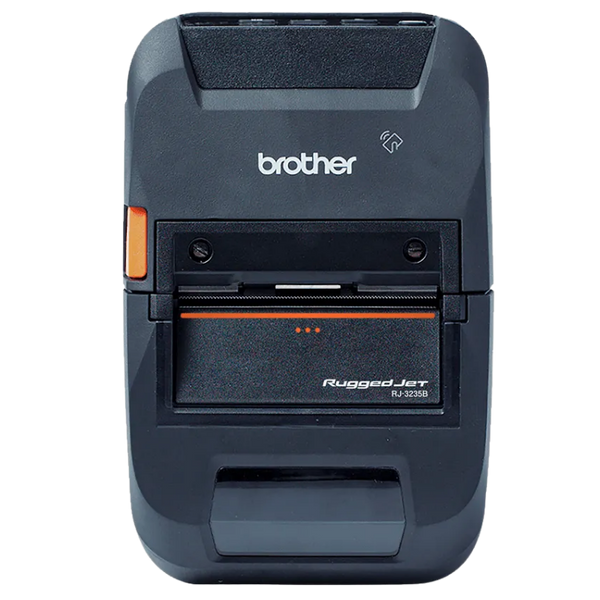
Brother RuggedJet Series
Mobile PrintingBelt Worn

Brother RuggedJet Series

Belt-worn receipt and label printing for drivers working on foot. The RuggedJet prints proof of delivery, receipts and return labels without the driver putting the parcel down, and is built for the drops and weather that come with the job.

  • RJ-3230B-L 3 inch, Bluetooth 5.0, MFi and USB-C
  • RuggedJet 2 for 2 inch receipts and labels
  • RuggedJet 4 with NFC pairing for larger documents
  • Car charger and belt clip available
2, 3 and 4 inchMFi CertifiedBluetooth 5.0Receipts and LabelsRugged
View RuggedJet Printers
Zebra Mobile Computers
Mobile ComputingHandheld

Zebra Mobile Computers

The device the driver carries all day. Zebra's TC2X and EC series pair a proper 2D scan engine with Android and a supported upgrade path, which matters when the fleet has to stay on a certified OS version for the software running on it.

  • TC22 and TC2X series for general delivery and route work
  • EC50 and EC55 where a smaller pocketable device suits
  • 2D imager reads damaged and dirty parcel labels
  • Vehicle cradles, chargers and holsters available
Android2D ImagerWWAN OptionVehicle CradleRugged
View Zebra Mobile Computers

Equipping a field team?

Tell us your job types, what documents engineers have to leave on site, how long a typical day runs and what software they use. We will specify the handheld, printer, mounting and charging together, and confirm the offline path works before you roll out.

Request a Field Recommendation

Field Service Hardware Questions

Grouped by trade and by decision. If your question is not here, the answer is usually that it depends on the document you have to leave on site.

Which field service trades do you supply?

The hardware profile is similar across most field trades, so we supply a wide range: HVAC and refrigeration, pest control, plumbing and heating, electrical and test-and-inspection, fire and security systems, lift and escalator servicing, medical equipment maintenance, grounds and facilities maintenance, appliance repair, and utility metering and inspection.

What changes between them is the document and the label. Pest control needs treatment records; HVAC needs refrigerant and commissioning certificates; electrical needs test certificates; lift servicing needs inspection records attached to the equipment. Tell us the trade and the paperwork and we will specify against it.

Which manufacturers do you carry for field service?

For mobile printing, Brother Mobile covers both ends: the PocketJet series for full-page certificates and worksheets, and the RuggedJet series for receipts and labels on the belt.

For rugged handhelds and tablets, Zebra, Honeywell, Datalogic and Unitech. For vehicle mounting and charging we work across several manufacturers depending on the vehicle.

We are not tied to one brand. What suits depends on your job types, your document requirements and whether engineers work from a van or on foot.

What field service solutions do you offer?

Field service hardware for dispatch, job capture and completion. Asset tracking for installed equipment, tools and test instruments. Inventory control for van stock and replenishment.

Barcode labelling for asset and compliance labels that survive years outdoors, and B2B re-ordering where engineers also sell or replenish on site.

We supply the hardware behind your field service management software rather than the software itself.

What receipt printers do pest control companies use?

Pest control technicians usually need two things at the door: a service receipt for the customer, and a treatment record that lists the products applied. In most jurisdictions the product record has to be left on site, which is what decides the printer.

For a simple receipt, a belt-worn 2 or 3 inch Bluetooth printer like the Brother RuggedJet works well and keeps the technician's hands free. Where the treatment record lists active ingredients, application rates and safety information, that runs to a full page, and a PocketJet in the vehicle is the right answer.

Confirm MFi certification if technicians use iPhones, and specify a vehicle charger, because a printer that only charges overnight will not last a full route.

Browse mobile printers.

What computers or tablets do pest control technicians use?

A rugged handheld or small rugged tablet, running the route and treatment software, with cellular so records sync between stops. Screen size is the trade-off: technicians filling in treatment forms and diagrams prefer a 6 to 8 inch screen over a phone-sized device.

Sealing matters more here than in most field trades, because devices are handled with gloves after chemical application and get wiped down between properties. An IP-rated, wipeable housing is worth specifying rather than a consumer tablet in a case.

Battery is the other one. A full route with the screen on all day will flatten a consumer device by early afternoon, so size for the longest route and fit a vehicle charger.

Browse mobile computers.

What hardware do HVAC technicians need?

HVAC work is asset-centric, so scanning matters more than in most trades. A rugged handheld with a proper 2D imager lets the technician scan the unit's asset label and pull up its service history, refrigerant records and previous faults before opening anything.

Printing is usually full page. Service certificates, refrigerant handling records and commissioning sheets are documents the customer files or produces at inspection, which is why a PocketJet in the van is common on HVAC fleets.

Add a mobile label printer if technicians tag units they install or service. A polyester asset label applied at commissioning is what makes the next visit faster, and it needs to survive a plant room or a rooftop for years.

Does hardware work on rooftops and in plant rooms?

Only if specified for it. Two things fail on a rooftop: the screen and the signal. A standard display washes out in direct sunlight so the technician cannot read the job, and plant rooms and basements frequently have no cellular coverage at all.

Specify a display rated for outdoor readability and a device with cellular, paired with software that queues offline. Temperature range matters too, since a rooftop in summer and a plant room in winter both sit outside the operating range of consumer hardware.

Sealing against rain and dust is the third. An IP rating is chosen at purchase and cannot be added with a case.

Do engineers need a full-page printer in the van?

It depends what they have to leave behind. A job docket or parts receipt is receipt width and a belt-worn printer handles it well.

A service certificate, inspection record, safety notice or detailed worksheet is a full page. Those are the documents a customer files, an inspector asks for, or a regulator requires, and folding one down to three inches looks exactly as unprofessional as it sounds. The Brother PocketJet prints a full 8.5 inch page from the vehicle for that reason.

Engineers producing both usually carry a PocketJet in the van and a belt printer for on-the-spot dockets.

What happens in a basement or plant room with no signal?

The hardware side of this is cellular, which cannot be retrofitted, so a Wi-Fi only device will only sync at base. Beyond that it is a software question: the app has to queue photos, signatures, parts usage and notes locally and sync when coverage returns.

Test this deliberately before rollout. Put a device in the worst location you service and complete a full job on it. Offline capture that has never been tested is the most common reason engineers go back to paper.

Can engineers just use their phones?

Many do, and for light work with good coverage it can be fine. The problems appear at the edges: a phone camera is not a scan engine, so scanning asset barcodes is slow and unreliable; the screen washes out on a roof in sunlight; the battery does not last a full day with the screen on; and a dropped phone on a job is an engineer out of action.

A rugged handheld adds a proper 2D imager, a daylight-readable display, a full-shift battery and a drop rating. Whether that is worth it depends on how much of the job depends on scanning and how far the engineer is from a replacement device.

Can devices be cleaned after chemical exposure?

Rugged devices with sealed housings can be wiped down; consumer devices in fabric cases cannot, and the case itself becomes the contamination problem.

For pest control, agricultural spraying and similar work, specify a sealed housing with no fabric trim and check the manufacturer's list of approved cleaning agents. Some plastics are attacked by solvents commonly used to remove chemical residue, and warranty claims are refused where an unapproved agent has been used.

Healthcare variants of some devices use disinfectant-ready plastics and are worth considering where chemical wipe-down is frequent, even outside a clinical setting.

Can technicians take payment at the door?

Yes, and for trades billing per visit rather than on account it is usually worth doing. A Bluetooth card reader paired with the technician's handheld takes contactless and chip payment, and the receipt prints from the same belt-worn printer producing the job docket.

Two things to confirm. The reader has to be supported by your payment processor, since encrypted readers are keyed to a specific processor and cannot be moved between them. And the reader needs its own charging, which is one more thing in the vehicle charging plan.

Browse card readers.

How do we stop van stock going missing?

Scan parts out at the point of use rather than reconciling at the end of the day. A cordless scanner or the handheld's own imager, used when the part comes off the shelf, keeps van stock accurate and makes sure the part reaches the invoice.

Label the van shelving as well as the parts. Bin and shelf labels turn a van into a small warehouse with locations, which is what makes replenishment against actual usage possible rather than guessing.

Where coverage is poor, a scanner with batch memory keeps working and uploads when the technician is back in signal.

Which asset labels survive years on installed equipment?

Polyester or acrylic with thermal transfer printing. A paper label with direct thermal print will be unreadable within a season in a plant room, and faster outdoors, so the next engineer cannot identify the asset and the service history is effectively lost.

Match the adhesive to the surface as well. Powder-coated metal, plastic housings and outdoor concrete all behave differently, and a label that lifts at the corner will be gone within a year. For equipment in oil or exposed to UV, specify both facestock and adhesive rather than accepting a general-purpose label.

What paper do mobile field printers use?

Direct thermal, so there is no ribbon or cartridge to carry in the vehicle. The consumable is the paper alone, which is one of the reasons direct thermal dominates mobile printing.

Width depends on the printer. Belt-worn receipt printers use 2 or 3 inch rolls; full-page printers like the PocketJet use 8.5 inch fanfold or roll stock. Keep a spare roll in the vehicle for each, because running out mid-route means the job cannot be closed on site.

Remember that direct thermal fades with heat and sunlight, so the printed copy is the customer's record and your software holds the archive. A receipt left on a dashboard will not be readable in six months.

How should hardware be mounted in a service vehicle?

Everything the technician uses regularly should have a fixed home that also charges it. Loose hardware slides around, gets damaged and ends up under a seat, and a device that is not in its cradle is not charging.

Typically that means a mount and charging cradle for the handheld, a secured position for the printer, and a 12V supply feeding both. Mounts should be rated for vehicle vibration rather than the suction-cup type sold for phones, which fail in heat and drop the device.

Browse mounting hardware and vehicle chargers.

Should every technician have the same hardware?

Almost always, yes. Once a team shares one device model, chargers, batteries, mounts and spares interchange, a failure mid-route becomes a swap rather than a lost day, and a technician covering someone else's round already knows the equipment.

The exception is where trades genuinely differ. A team doing both installation and reactive service may need full-page printing in the install vans and belt printers on the service vans, but the handheld should still be the same model across both.

Buying the cheapest option each time quietly removes all of that, and the saving disappears the first time someone needs a spare battery at eight in the morning.

How long should field hardware last?

Rugged devices are generally specified on a four to five year cycle, and the constraint is usually software support rather than physical failure. An Android device that stops receiving security updates becomes a compliance problem before it becomes a hardware problem.

Ask two questions when specifying: how long the manufacturer commits to OS and security updates, and how long spare batteries and accessories will remain available. Batteries degrade well before the device does, and a fleet that cannot get replacement batteries is effectively at end of life regardless of condition.

Hardware Selection Support

Not sure which model is right?

Send us what you are trying to do and we will come back with a specific recommendation rather than a catalogue. If you are replacing equipment, a model number or a photo of the existing setup is usually enough to work from.

  • Solutions experts on staff to answer your hardware questions
  • 30 day return policy, excluding consumables
  • In-stock items ship same day when ordered by 4:00pm Eastern
  • Volume and multi-location pricing reviewed on request

Ask a Question

We usually respond within 10 minutes on weekdays.

We use your details to answer your enquiry and nothing else.