TSC
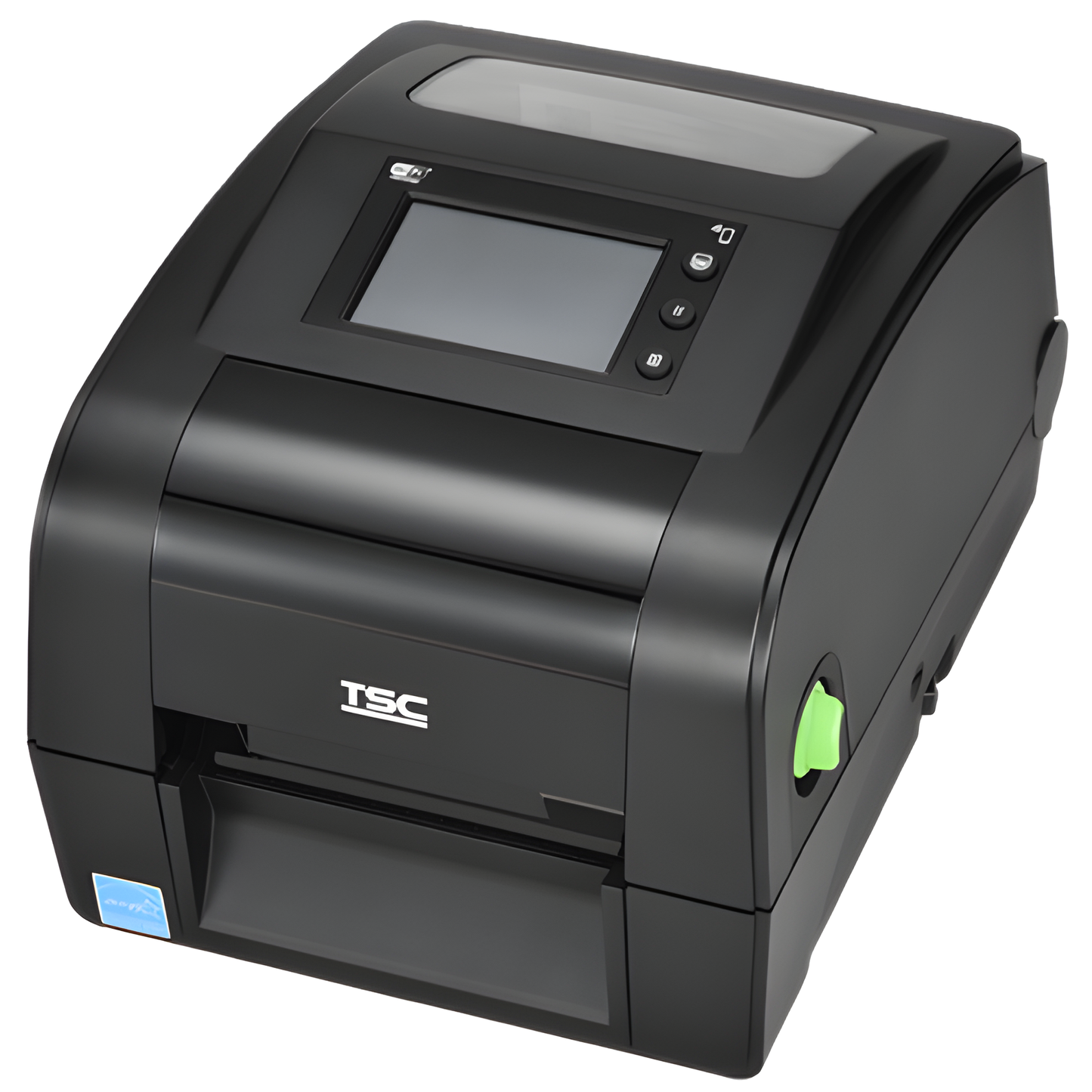
TSC DH240T 4-Inch Direct Thermal Label Printer 203 DPI Ethernet USB - DH240-A001-0001
TSC DH240T 4-Inch Direct Thermal Label Printer 203 DPI Ethernet USB - DH240-A001-0001
SKU:DH240-A001-0001
TSC DH240T 4-Inch Direct Thermal Label Printer — DH240-A001-0001
The TSC DH240T is a current-generation 4-inch direct thermal desktop label printer designed for barcode labels, shipping labels, inventory labels, retail labels, food and beverage labeling, product identification and other everyday business workflows. This US configuration combines 203 dpi printing, speeds up to 8 inches per second, a color LCD, USB, RS-232 serial, Ethernet and USB Host connectivity.
Current Replacement for the TSC TDP-247 Series
The TSC DH240 Series replaces the discontinued TDP-247 Series. That makes the DH240T an important current option for businesses replacing older TDP-247 printers or standardizing new desktop label-printing deployments.
TSC TDP-247
- 203 dpi
- Direct thermal
- Up to 7 ips
- USB
- RS-232 serial
- Parallel on common legacy configurations
- Older desktop printer platform
TSC DH240T
- 203 dpi
- Direct thermal
- Up to 8 ips
- USB
- RS-232 serial
- Built-in Ethernet
- USB Host
- Color LCD with buttons
- 128 MB Flash
- 128 MB SDRAM
Important: The DH240T should not be assumed to be a drop-in replacement for every TDP-247 installation. Older TDP-247 systems using a parallel connection may need to move to USB, serial or Ethernet. Confirm your software, driver, interface and label requirements before replacing the printer.
Why Choose the TSC DH240T?
Fast 8 IPS Printing
The 203 dpi DH240T prints at speeds up to 8 inches per second, making it a strong desktop option for shipping, receiving, retail, inventory and other recurring label-printing workflows.
Built-In Ethernet
Ethernet connectivity makes the DH240T well suited to networked label-printing environments where a printer needs to be available to a workstation, application or supported network workflow without relying only on a direct USB connection.
Color LCD Interface
The integrated color LCD with buttons gives users a convenient way to view printer status and work through supported configuration and operating functions directly at the printer.
USB Host Connectivity
USB Host expands the printer's connectivity options for compatible peripheral and standalone workflow requirements. Actual peripheral support depends on the application and configuration.
Best For
- Shipping and logistics labels
- Warehouse inventory labels
- Retail barcode and price labels
- Product and item identification
- Shelf and stock labels
- Food and beverage labels
- Healthcare and office labeling
- Receiving and fulfillment stations
- Asset and inventory workflows using direct thermal media
- Networked label-printing stations requiring Ethernet
- Businesses replacing a TSC TDP-247
- Software partners and multi-location deployments needing a current TSC desktop platform
TSC DH240T DH240-A001-0001 Specifications
| Specification | DH240-A001-0001 |
|---|---|
| Manufacturer | TSC |
| Model | DH240T |
| Manufacturer Part Number | DH240-A001-0001 |
| Printer Type | Desktop barcode / label printer |
| Print Method | Direct thermal only |
| Print Resolution | 203 dpi / 8 dots per mm |
| Maximum Print Speed | Up to 8 inches per second / 203 mm per second |
| Maximum Print Width | 4.25 inches / 108 mm |
| Maximum Print Length | Up to 1,000 inches / 25,400 mm under supported conditions |
| Display | Color LCD with buttons |
| USB | Yes |
| RS-232 Serial | Yes |
| Ethernet | Yes |
| USB Host | Yes |
| Parallel | No on this configuration |
| Flash Memory | 128 MB |
| SDRAM | 128 MB |
| Expandable Flash | microSD expansion supported by the DH240 platform |
| Real-Time Clock | Included on this US DH240T configuration |
| Buzzer | Included on this US DH240T configuration |
| Printer Management | TSC Console support; additional enterprise-management options depend on deployment and licensing |
| Replacement Family For | TSC TDP-247 Series |
Important: DH240T Is Direct Thermal Only
The TSC DH240T prints on compatible direct thermal label media and does not require ink, toner or a thermal-transfer ribbon.
Direct thermal printing is a strong choice for shipping labels, retail labels, inventory labels, food labels and other applications where ribbon-free operation is preferred. If you need longer-lasting labels, outdoor durability, synthetic media or ribbon-based printing, compare an appropriate TSC thermal-transfer printer instead.
Direct Thermal vs. Thermal Transfer
| Feature | TSC DH240T Direct Thermal | Thermal Transfer Printer |
|---|---|---|
| Ribbon Required | No | Yes |
| Typical Media | Heat-sensitive direct thermal labels | Thermal-transfer labels plus ribbon |
| Best For | Shipping, inventory, food, retail and short-to-medium-life labels | Longer-life product, asset, synthetic, outdoor and harsh-environment labels |
| Daily Operation | No ribbon changes | Ribbon changes required |
| Choose When | You want straightforward ribbon-free label printing | Label durability or specialized media is more important |
Ethernet, USB or Serial: Which Connection Should You Use?
Use USB When
- The DH240T connects directly to one workstation.
- Your labeling application supports direct USB printing.
- The printer will remain near the connected computer.
- You want a straightforward local connection.
Use Ethernet When
- The printer needs to connect to your local network.
- Your application expects a network-addressable printer.
- You want greater placement flexibility than a direct USB connection provides.
- The printer is part of a warehouse, retail or multi-workstation environment.
Use RS-232 Serial When
- Your software or equipment specifically communicates through a serial connection.
- You are replacing a legacy printer that already uses RS-232.
- The application has been designed around serial communications.
Use USB Host When
- Your supported workflow requires a compatible USB peripheral.
- You are building a more specialized standalone or integrated labeling workflow.
- Your software and device configuration specifically support the connected peripheral.
Replacing a TSC TDP-247?
The DH240 Series is the manufacturer-designated replacement family for the TDP-247 Series. The DH240T maintains the core 203 dpi direct thermal desktop format while moving the platform toward faster printing, modern Ethernet connectivity, USB Host, substantially more memory and a color display.
| Feature | TDP-247 | DH240T |
|---|---|---|
| Status | Discontinued | Current-generation replacement direction |
| Print Method | Direct thermal | Direct thermal |
| Resolution | 203 dpi | 203 dpi |
| Maximum Speed | Up to 7 ips | Up to 8 ips |
| Maximum Print Width | Approximately 4.25 inches / 108 mm | 4.25 inches / 108 mm |
| USB | Yes | Yes |
| Serial | Yes on common configurations | Yes |
| Parallel | Available on common legacy configurations | No on this DH240T configuration |
| Ethernet | Not standard on the legacy configuration linked below | Yes |
| USB Host | No | Yes |
| Flash Memory | 4 MB on common TDP-247 configuration | 128 MB |
| SDRAM | 8 MB on common TDP-247 configuration | 128 MB |
| User Interface | Basic LED/button interface | Color LCD with buttons |
TDP-247 Parallel-Port Users
If your existing TDP-247 communicates through a parallel printer port, do not assume the DH240T is a plug-and-play replacement. The DH240T configuration on this page provides USB, RS-232 serial, Ethernet and USB Host instead of parallel.
Confirm that your POS, ERP, warehouse, inventory or label-printing application can move to USB, serial or Ethernet before replacing a parallel-connected TDP-247.
What Labels Does the TSC DH240T Use?
The DH240T uses compatible direct thermal label stock. The right label is determined by more than simply calling it a 4-inch label printer.
Before ordering labels, confirm:
- Label width
- Label length
- Roll diameter
- Core diameter
- Gap, black-mark or other sensing requirements
- Adhesive type
- Label material
- Application temperature and environment
- Software template dimensions
Shop barcode and label media or contact ShopPOSPortal if you need help matching existing labels to the DH240T.
Common Buying Mistakes
- Buying direct thermal when thermal transfer is required. The DH240T does not use a ribbon.
- Assuming every 4-inch label fits. Confirm label dimensions, roll size, core and sensor requirements.
- Replacing a parallel TDP-247 without checking the connection. This DH240T configuration does not include parallel.
- Choosing by resolution alone. Software, printer language, drivers, interface and media requirements also matter.
- Assuming Ethernet automatically means software compatibility. Your application must support the printer and intended connection method.
- Ignoring label durability. Direct thermal media is not ideal for every long-term or harsh-environment application.
- Skipping calibration after installation. Media sensing and label size should be configured and tested before production use.
Compatibility Before Ordering
Compatibility depends on your POS software, operating system, connection type, drivers, accessories, and configuration. Confirm compatibility before ordering.
For label printers, also confirm your label dimensions, media type, sensing method, printer language requirements, application software and any existing label templates before deployment.
DH240T Setup Checklist
Before Installation
- Confirm label dimensions and media type
- Select USB, Ethernet or serial connectivity
- Confirm software and driver support
- Record any existing label-template dimensions
- Verify printer-language requirements
During Setup
- Install the appropriate TSC driver or software integration
- Connect the selected interface
- Load the correct direct thermal labels
- Configure media dimensions
- Calibrate media sensing
- Print and scan a test barcode before production use
Printer Management & Deployment
The DH240 Series supports TSC printer-management tools designed to help with configuration and deployment. This can be useful for businesses, software partners and multi-location environments managing more than one label printer.
Management capabilities, software support and licensing can vary by tool and deployment. Confirm the requirements for your environment before standardizing a fleet.
What You May Need With the DH240T
Direct Thermal Labels
Choose compatible direct thermal label stock matched to your required dimensions, sensing method and application.
Interface Cable
Your installation may require a USB, Ethernet or serial cable depending on the connection method and what is included with the specific configuration.
Label Design Software
Custom barcode, inventory, product and shipping-label workflows may require compatible label-design software or integration with your existing business application.
Barcode Scanner
For inventory, receiving and product workflows, pair printed barcode labels with a compatible scanner or mobile computer.
Related Label Printing Resources
Need Help Choosing or Replacing a Label Printer?
Not sure whether the DH240T is right for your software, labels or existing TDP-247 installation? ShopPOSPortal can help review the printer model, interface, label dimensions, media type, application software and deployment requirements before you order.
Ask a Hardware Specialist Compare Label PrintersWhy Buy the TSC DH240T from ShopPOSPortal?
ShopPOSPortal helps software companies, ISVs, retailers, restaurants, warehouses and multi-location businesses select and deploy compatible POS and barcode hardware. We can help with current-model selection, replacement planning, connectivity, label media and deployment requirements.
- Commercial POS and barcode hardware specialists
- TDP-247 replacement guidance
- Label and media matching assistance
- USB, serial and Ethernet deployment guidance
- Support for software partners and multi-location rollouts
- Business and volume purchasing assistance
Frequently Asked Questions
What is the TSC DH240T DH240-A001-0001?
The DH240-A001-0001 is a US TSC DH240T configuration featuring 203 dpi direct thermal printing, a color LCD, USB, RS-232 serial, Ethernet and USB Host connectivity.
Is the TSC DH240T direct thermal or thermal transfer?
The DH240T is direct thermal only. It prints on compatible heat-sensitive direct thermal labels and does not require a ribbon.
How fast does the TSC DH240T print?
The 203 dpi DH240T supports print speeds up to 8 inches per second under supported operating conditions.
What is the print resolution of the DH240T?
The DH240T prints at 203 dpi, or 8 dots per millimeter.
How wide can the DH240T print?
The 203 dpi DH240T supports a maximum print width of approximately 4.25 inches, or 108 mm.
Does the DH240T have Ethernet?
Yes. The DH240-A001-0001 configuration includes built-in Ethernet along with USB, RS-232 serial and USB Host connectivity.
Does the DH240T have a parallel port?
No. The configuration on this page does not include a parallel interface. This is particularly important when replacing older TDP-247 printers that may have been connected through parallel.
Does the DH240T require ink, toner or ribbons?
No. The DH240T uses direct thermal technology. It requires compatible direct thermal labels but does not use ink, toner or thermal-transfer ribbons.
Does the DH240T replace the TSC TDP-247?
Yes. TSC identifies the DH240 Series as the replacement family for the discontinued TDP-247 Series. Individual installations still need to be checked for software, interface, driver and label compatibility.
Can I use the same labels from my TDP-247 in the DH240T?
Possibly. Both printers are 4-inch direct thermal platforms, but label compatibility depends on the exact label width, length, roll diameter, core, sensing method, material and application. Confirm the existing media before moving it to a replacement printer.
Can I use the same TDP-247 label templates?
Many templates may be reusable, but software, driver, printer-language and page-size settings can affect output. Test important templates and verify barcode readability before deploying the replacement printer.
What is USB Host used for on the DH240T?
USB Host can support compatible USB peripherals and specialized workflows. Actual support depends on the connected device, printer configuration and software environment.
Should I use USB or Ethernet with the DH240T?
USB is typically useful for a direct connection to one workstation. Ethernet is often preferred when the printer needs to connect through a local network or be deployed as part of a networked business workflow. Your software must support the selected connection method.
Can the DH240T print shipping labels?
Yes. The DH240T is well suited to compatible direct thermal shipping labels as long as the label dimensions, software and connection method meet the application's requirements.
Is the DH240T suitable for warehouse inventory labels?
Yes. Its 203 dpi resolution, up to 8 ips print speed, 4.25-inch print width and Ethernet connectivity make it a strong desktop option for many warehouse receiving, inventory and fulfillment workflows.
When should I choose a thermal-transfer printer instead?
Choose a thermal-transfer model when you need labels intended for longer service life, synthetic media, outdoor use, chemical resistance or other applications where direct thermal label durability may not be sufficient.
Can ShopPOSPortal help confirm compatibility?
Yes. ShopPOSPortal can help review your existing printer, software, operating system, label dimensions, media type, connection requirements and deployment needs before you order.
Bottom Line
The TSC DH240T DH240-A001-0001 is a strong current-generation choice for businesses that need fast 203 dpi direct thermal desktop label printing with USB, RS-232 serial, Ethernet and USB Host connectivity. It combines up to 8 ips printing, a 4.25-inch maximum print width, substantial onboard memory and a color LCD in a compact desktop platform.
It is also particularly important for businesses replacing the discontinued TSC TDP-247, because TSC identifies the DH240 Series as the replacement family.
If your existing TDP-247 uses a parallel connection, or if you are uncertain about label media, software, printer language or connectivity, confirm compatibility before ordering.