Star Micronics
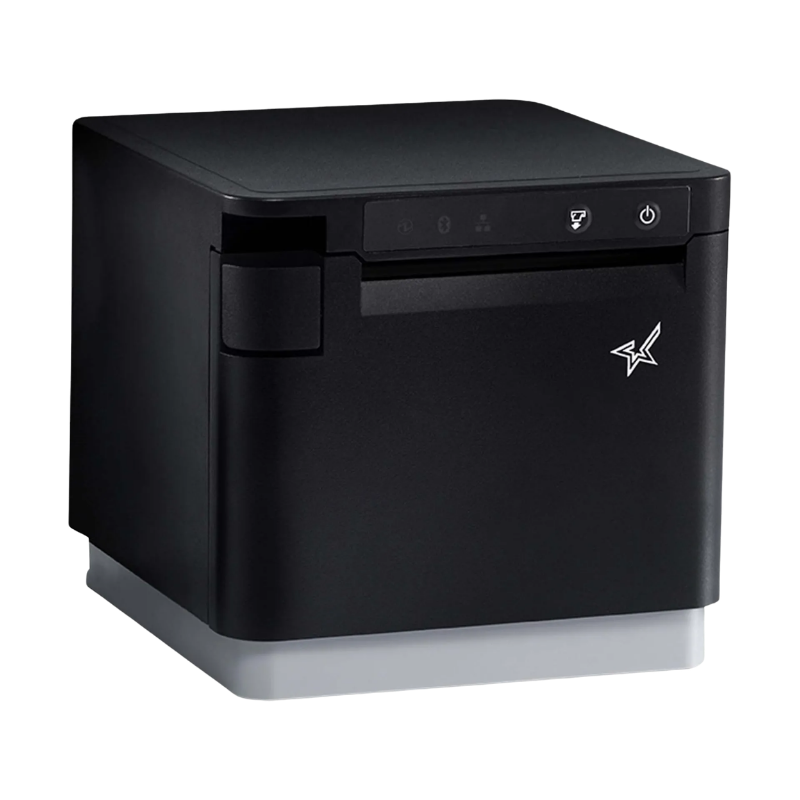
Star Micronics mC-Print3 39659310 | Bluetooth, Ethernet & USB-C Receipt Printer
Star Micronics mC-Print3 39659310 | Bluetooth, Ethernet & USB-C Receipt Printer
SKU:39659310
Star Micronics mC-Print3 MCP31CBi — Bluetooth, Ethernet & USB-C
The Star Micronics mC-Print3 39659310 is a compact 3-inch thermal receipt printer designed for modern retail, restaurant, hospitality and tablet-based POS systems. This exact MCP31CBi BLK US configuration includes Bluetooth, Ethernet LAN, USB-C Power Delivery, SteadyLAN, USB-A peripheral connectivity and CloudPRNT Next.
Why Choose the Star mC-Print3?
Bluetooth + Ethernet + USB-C
Multiple connection options make this model suitable for tablet POS, traditional networked checkout and modern USB-C installations.
Up to 400 mm/sec
Fast thermal printing helps keep checkout lines moving in busy retail, restaurant and hospitality environments.
Compact Front-Loading Design
Front-loading paper and front receipt exit make the printer easier to place beneath counters or in locations where space is limited.
Star Micronics 39659310 Specifications
| Manufacturer | Star Micronics |
|---|---|
| Part Number | 39659310 |
| Model | MCP31CBi BLK US |
| Product Family | mC-Print3 |
| Color | Black |
| Print Method | Direct thermal |
| Resolution | 203 dpi |
| Maximum Print Speed | Up to 400 mm/sec |
| Paper Width | 80 mm standard; 58 mm with paper guide |
| Autocutter | Guillotine partial-cut autocutter |
| Bluetooth | Yes |
| Ethernet LAN | Yes |
| USB-C | Yes — Power Delivery for compatible iOS, Android and Windows devices |
| USB-A Hub | Yes |
| SteadyLAN | Yes |
| Cloud Printing | CloudPRNT Next |
| Emulation | StarPRNT |
| Cash Drawer Support | Compatible printer-driven cash drawer support |
| Dimensions | 132 W × 140 D × 125 H mm |
| Reliability | 60 million lines MCBF; 200 km print head life |
| Cutter Life | 2 million cuts |
Connectivity Options
Bluetooth
Built-in Bluetooth allows compatible tablets, mobile devices and POS applications to communicate with the printer without requiring a direct network cable.
Ethernet LAN
Ethernet is a strong choice for fixed checkout stations where a stable wired network connection is preferred. The printer can be connected to the local network and accessed by compatible POS applications and devices.
USB-C with Power Delivery
The MCP31CBi supports USB-C connectivity with Power Delivery for compatible iOS, Android and Windows devices. This can simplify tablet POS installations by allowing supported devices to communicate with the printer while receiving power.
Star SteadyLAN
SteadyLAN is designed for modern tablet POS installations. With compatible hardware, it can provide a wired Ethernet connection to a USB-C-connected tablet while the printer also supplies power to the device.
USB-A Peripheral Hub
The integrated USB hub can support compatible peripherals such as HID devices, displays and USB memory devices, helping reduce cable clutter around the checkout counter.
Designed for Modern POS Systems
The mC-Print3 is designed for businesses moving beyond older serial or USB-only receipt printers. Its combination of Bluetooth, Ethernet and USB-C makes it a flexible option for a variety of POS environments.
- Retail checkout counters
- Restaurants and cafes
- Bars and hospitality
- Tablet-based POS systems
- Cloud-based POS systems
- Quick-service restaurants
- Service counters
- Multi-location businesses
Cash Drawer Support
The Star mC-Print3 can be used with a compatible printer-driven cash drawer. In this type of setup, the cash drawer connects to the printer and the POS application sends the drawer-open command through the printer.
This allows you to create a complete checkout station with a receipt printer and full-size or compact cash drawer without requiring a separate cash drawer connection to the tablet or computer.
Receipt Paper
The mC-Print3 is designed primarily for 80 mm thermal receipt paper. In the U.S., this is commonly sold as approximately 3.125-inch thermal receipt paper.
The printer can also use 58 mm paper with the appropriate paper guide.
Front-Loading, Front-Exit Design
The mC-Print3 uses a front-loading paper design with receipts exiting from the front of the printer. This helps make paper changes easier in compact checkout environments and allows the printer to be installed under a counter or shelf where top access may be limited.
CloudPRNT Next
CloudPRNT Next allows compatible web and cloud-based applications to communicate with Star printers without relying on a traditional local printer driver workflow. This makes the mC-Print3 particularly useful for modern web-based POS and distributed printing environments.
Software & Development Support
Star supports the mC-Print3 platform with a broad range of software tools, utilities, SDKs and drivers for modern POS deployments.
- Star Quick Setup Utility for iOS and Android
- Star Windows Software
- StarXpand SDK
- StarPRNT SDK
- CloudPRNT Next
- WebPRNT Browser
- PassPRNT
- JavaPOS drivers
- CUPS drivers for macOS and Linux
What's Included?
- Star Micronics mC-Print3 printer
- Compact Star PS65 power supply
- Power cable
- Setup guide
Interface cables, cash drawers, paper and optional accessories are sold separately unless specifically stated otherwise in the product configuration.
Optional Accessories
- Compatible Star cash drawers
- Star mC-Sound kitchen buzzer
- BU01 standard buzzer
- Wall-mount bracket
- Compatible barcode scanners
- Thermal receipt paper
Frequently Asked Questions
What exact model is Star Micronics 39659310?
Does Star 39659310 have Bluetooth?
Does the mC-Print3 have Ethernet?
Does this printer have USB-C?
What is SteadyLAN?
Can I connect a cash drawer to this printer?
What receipt paper does the mC-Print3 use?
How fast does the mC-Print3 print?
Is this the Wi-Fi version?
Need Help Confirming the Right Printer?
Tell us the POS software you use, the device or operating system running it, and whether you need Bluetooth, Ethernet or USB-C. We can help confirm the appropriate printer configuration before you order.